

The board lists legs, not loads, so a load with no leg never appears. Post at least one leg to /api/v1/loadlegs/upsert after the load.
Why an Uploaded Load Isn't on the Board
Updated today
A load shows on the TrackFlo board only when one of its legs is linked to the load, both of the leg's end stops exist, its status maps to Active, it isn't ignored or deleted, today falls inside its board window, and it isn't on one of your company's exclusion lists. Every request can succeed and the load still not show, because each record is valid on its own and the problem is how they connect.
The fastest way to find which check fails is Load Lookup in Integration QA: it runs every check below for each leg and says what to send. The board refreshes every few minutes, so a load that just passed every check can take that long to appear.
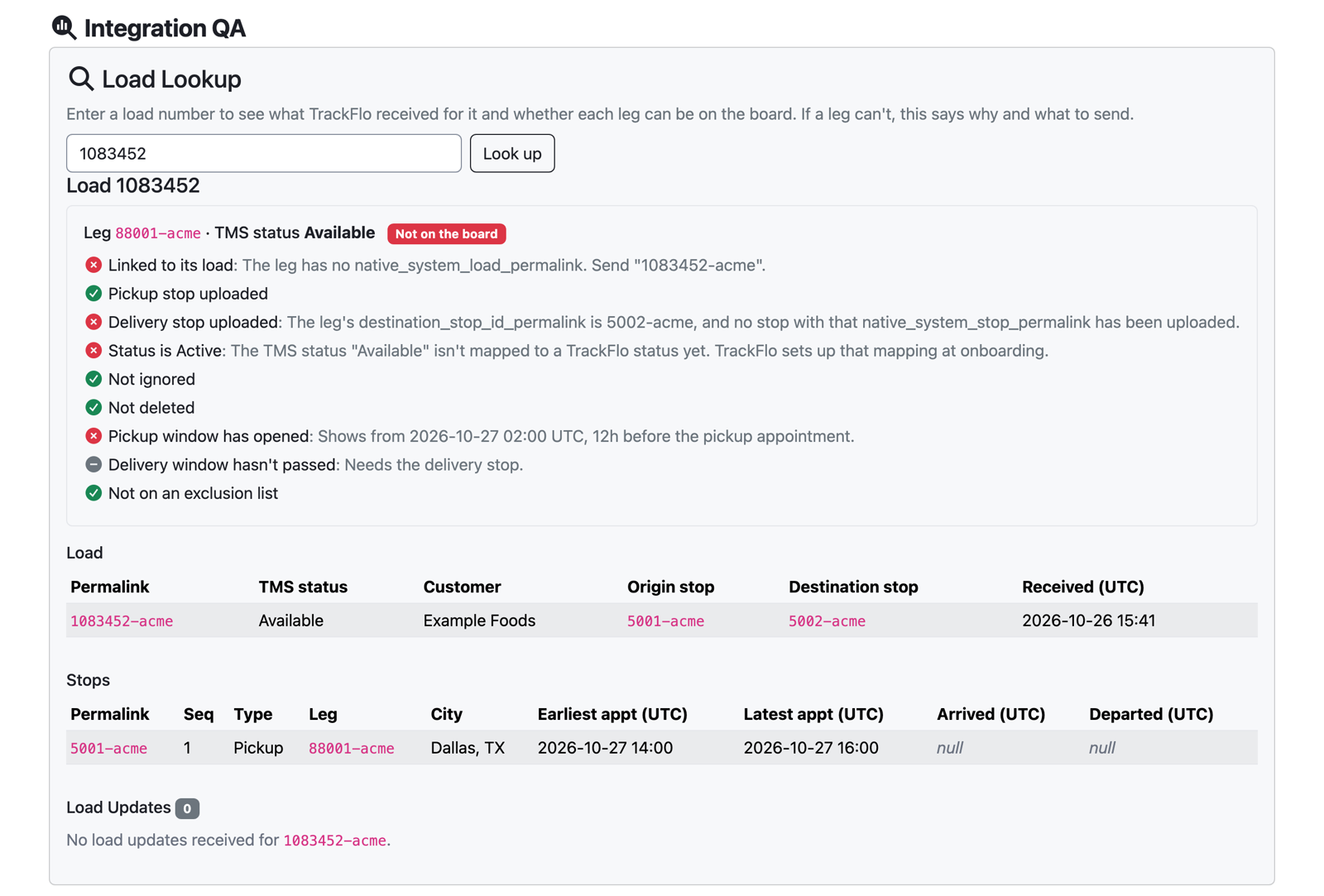
Each check, and the fix
No leg was uploaded for the load
The leg isn't linked to its load
Every leg needs native_system_load_permalink set to its load's permalink, for example 1083452-acme. Sending only native_system_load_id doesn't link it. If the permalink is set but names a load you haven't posted, post that load.
The pickup or delivery stop wasn't uploaded
The leg's origin_stop_id_permalink and destination_stop_id_permalink must each equal the native_system_stop_permalink of a stop you've posted. A common slip is posting stops under different IDs than the leg names. Also set each stop's native_system_load_leg_permalink to the leg it belongs to.
The status doesn't map to Active
You send statuses exactly as your TMS names them, and TrackFlo maps each one using the status mapping agreed at onboarding. Only statuses mapped to Active are on the board; the ones your mapping treats as not yet booked, finished or cancelled are left off on purpose. A status we haven't mapped yet also keeps the load off the board. Load Lookup names the status; send it to your TrackFlo contact to add to your mapping.
The pickup window hasn't opened
A load appears a set number of hours before its pickup stop's earliest_appointment_time_utc, 12 by default (your Admin can change it in Company Settings). Load Lookup shows the exact time it will appear. A pickup stop with no earliest_appointment_time_utc never appears.
The delivery window has passed
A load leaves the board a set number of hours after its delivery stop's latest_appointment_time_utc, 24 by default. When testing, use a load whose delivery appointment is still ahead. A delivery stop with no latest_appointment_time_utc never appears: for a single appointment time, send the same time as both earliest_appointment_time_utc and latest_appointment_time_utc.
The leg is ignored or deleted
A leg with deleted: true is hidden. A leg with ignore_load: null is treated as ignored: send false or leave the field out. A tracker can also mark a load Ignore inside TrackFlo.
The carrier or customer is on an exclusion list
Your company can keep loads off every board by carrier, by customer or by another field (Company Settings, the "Exclude from Workflows" fields). Load Lookup names the list and the value that matched. An Admin can remove the entry if the exclusion is unintended.
When the load still isn't there
If every check passes and the load hasn't appeared after a few minutes, check the board's own filters: a tracker's assigned-loads board or a custom board shows only part of the company's loads. Then send the load number to your TrackFlo contact.
Was this helpful?
Was this helpful?