

TrackFlo was copied on the customer thread, and replies go into the thread we captured. Copy us on the carrier thread only.
Stop Retyping Carrier Emails into Your TMS
Updated today
TrackFlo reads carrier emails and driver texts, pulls out the driver, ETA, stop times, and PODs, and posts them to your TMS after a person approves them, or automatically once you trust the extraction. Reps describe the same loop everywhere: a carrier emails a driver's phone number or an ETA, someone reads it, and someone types it into the TMS. Prospects call it "pretty manual, this duplicate effort" and "a lot of clicks."
What you need
A two-way TMS integration, so approved updates can be written back.
TMS write permission for whoever approves: Tracking Users and Admins have it, and an Internal User needs Can Send Updates to the TMS? turned on by an Admin.
Access to the email distribution lists that already receive carrier updates.
Set it up
1
Copy TrackFlo on your load emails
Add our address to the distribution lists that already receive carrier updates, and keep the load number in subjects. Without this step the inbound side sees nothing.
2
Turn on Collect Tracking Info
The rule asks carriers for driver and tracking details, so answers come back on a thread we already own.
3
Approve by hand for two weeks
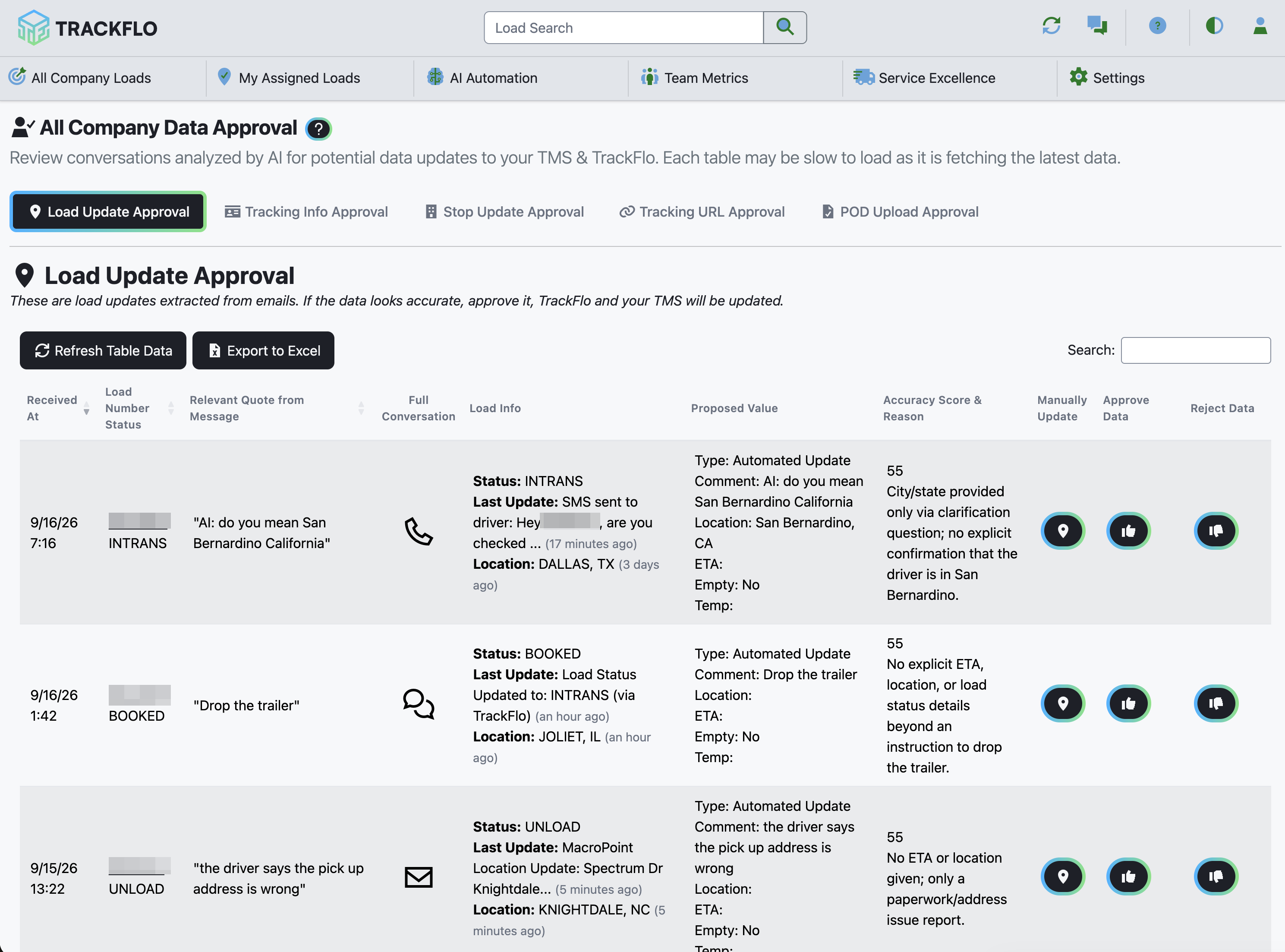
Each message is classified and every fact in it is compared with the load and labelled Net New, Augmentation, or Conflict, with a confidence score. Work the Data Approval board: approve, reject, and read the Accuracy Score & Reason and the quoted message on each row.
4
Grade the results
Mark rows in the Data Approval Audit as Correct or Incorrect. That audit is your evidence for the next step.
5
Raise auto-approval one cell at a time
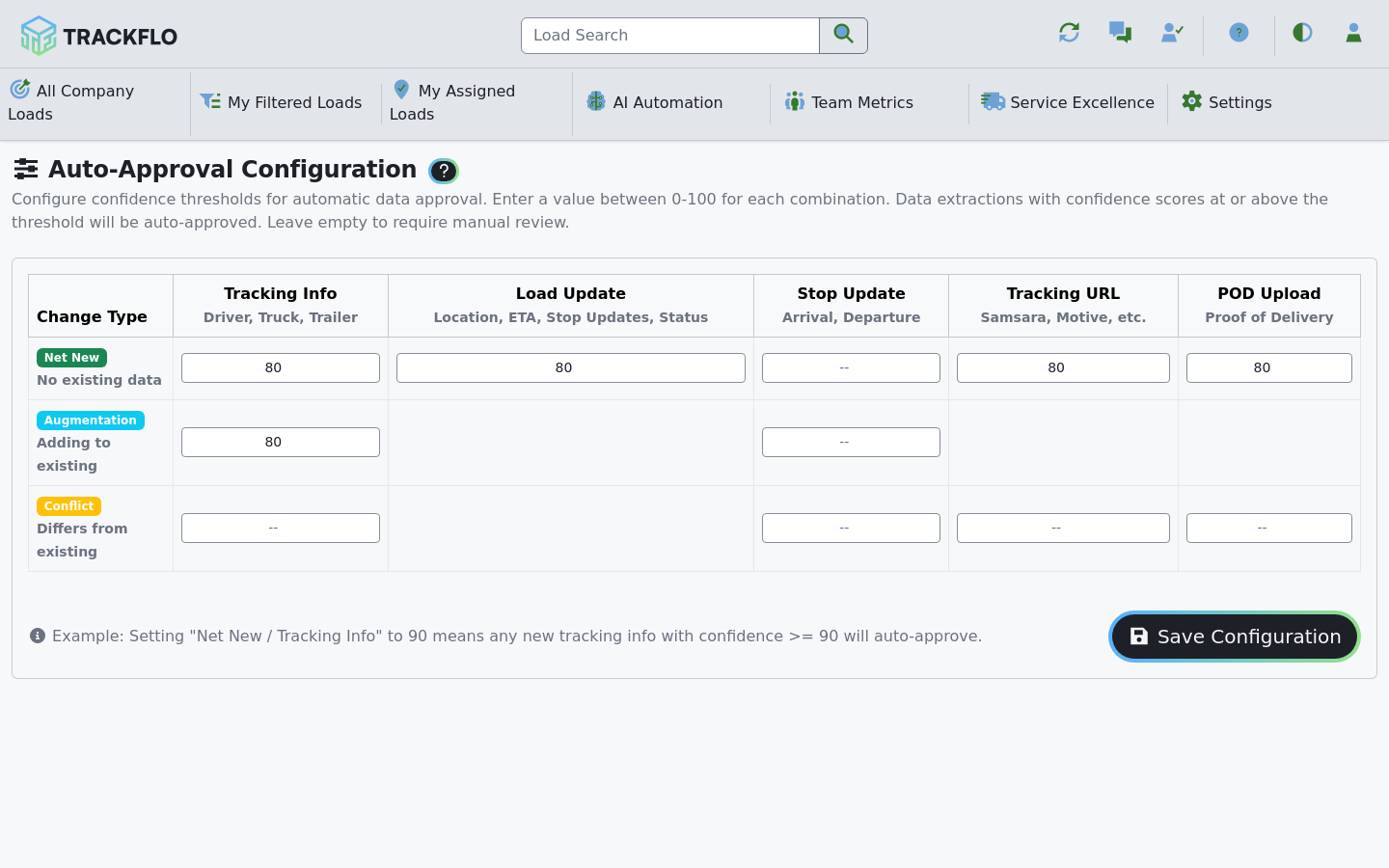
Set auto-approval thresholds cell by cell, starting with Net New / Tracking Info and Net New / Stop Update. Leave Conflict on manual review longest.
Each approved fact goes to your TMS as the matching update: tracking info as a driver info update, an ETA or location as a load update, arrival and departure as a stop update, and a POD as a document upload. Every one shows on the load's Update History tab with the TMS's response, so a rejected write is visible, not silent.
When it doesn't go to plan
Our replies went to the customer
An auto-approved update replaced what a tracker entered
A Conflict cell was set to auto-approve. Conflicts replace a value a person entered, so earn each cell with audit rows and leave Conflict on manual review longest.
The confidence score was high but the value was wrong
The score is how sure the AI was; the quoted message beside it shows whether it was right. Read the quote before approving.
Measure it
The Auto Approved tab of the Data Approval Audit grows daily and its rows grade Correct.
Trackers open the Data Approval board for conflicts only, and driver phones appear on loads before anyone asked for them.
Related recipes
Get Every Load on Tracking Before Pickup
Ask the carrier for tracking details and text the driver before pickup, automatically.
Read recipeHandle More Loads per Tracker Without Hiring
The order of operations that grows load count faster than headcount.
Read recipeProduct docs
Customers can sign in to open the full guides:
Was this helpful?
Was this helpful?