

The list leaves out anyone already on break or covering for someone else. One person can cover several people, but someone covering a break can't take one until that break ends. When nobody is free, ask an Admin.
Cover Lunch Breaks Without Dropping Loads
Updated today
When a tracker steps away, a coworker sees their loads in My Loads until they're back, with nothing reassigned and nothing to undo afterwards. Before, a break meant either loads nobody was watching for an hour or a lead moving loads by hand and moving them back. With Take Break, the tracker picks who covers and for how long, and ownership never changes.
What you need
Tracking Users and Admins can take a break and cover one. Internal Users can't do either.
Only an Admin can start a break for someone else.
To see breaks on shift scorecards: Shift Objective On on the tracker's Assignment Schedule.
Set it up
1
Start the break
Click Take Break in the navigation bar. Admins use the mug icon.

2
Pick who covers and for how long
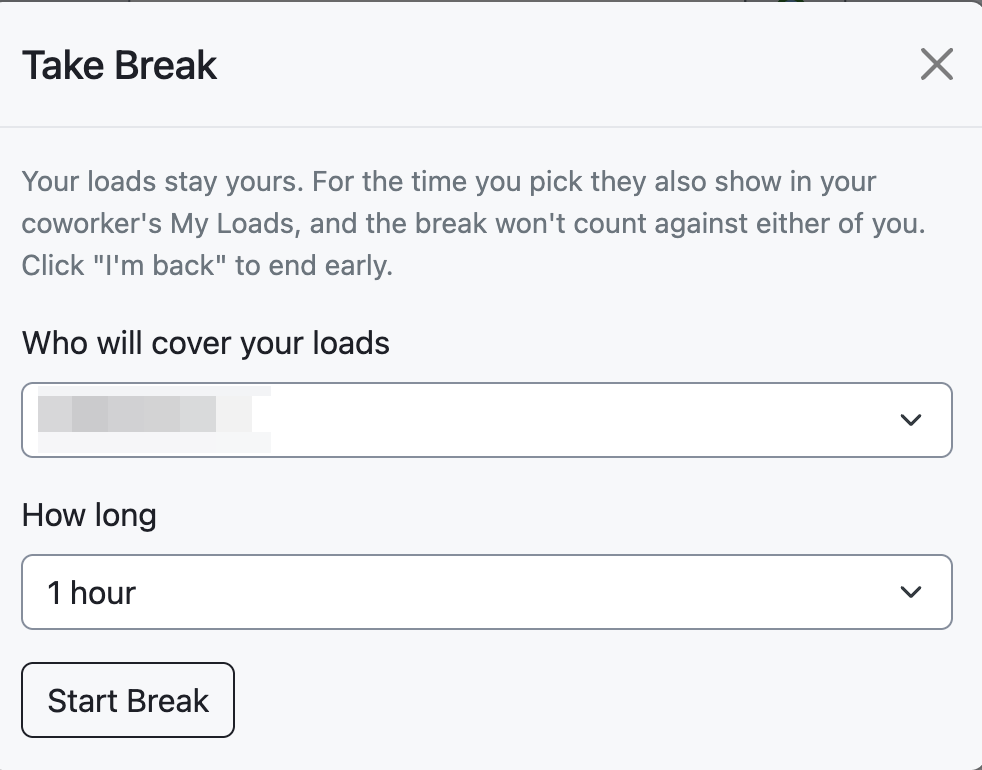
Choose a coworker under Who will cover your loads and a length under How long: 15 minutes, 30 minutes, 1 hour (the default), or 2 hours. Only people who are available appear in the list. Click Start Break.
3
Come back
The break ends on its own at the time you chose. To end it early, click I'm back in the banner. Your loads are yours alone again straight away.

While the break runs, the coworker sees a banner naming who they're covering and until when, and each covered load carries a Covering for pill in the Status column. Any load assigned to the away tracker during the break shows up for the coworker too.
Admins can see who is on break, end a break, and start one for someone under Settings > Assignment Management > Tracker Breaks, which also lists the last 24 hours of breaks.
When it doesn't go to plan
My coworker isn't in the list
The coworker didn't know they were covering
We don't send a notification. The coworker sees the banner on their next page load, so tell them before you step away.
The coworker can't end the break
Only the tracker on break or an Admin can end it.
I want to schedule lunch ahead of time
Breaks start when you click Start Break; they can't be scheduled ahead. The longest break is 2 hours.
Measure it
The tracker's shift scorecard has a Breaks tab with the minutes, who covered, and who ended it early. A break shows there only when the schedule has Shift Objective On.
A break that takes 15 minutes or more of an hour isn't held against the away tracker's hourly score, and updates the coworker posts on covered loads count toward the coworker.

Related recipes
Hand Off Loads Automatically at Shift Change
Schedules move loads to whoever is on shift, every two minutes.
Read recipeHold the Tracking Team Accountable with Real KPIs
Schedules that own the work, objectives that score it, and a five-minute weekly review.
Read recipeProduct docs
Customers can sign in to open the full guides:
Was this helpful?
Was this helpful?