

A new tier starts with every exception switched off. Open it and switch on the exceptions you want.
Track White-Glove Freight Tighter Than the Rest
Updated today
Give high-value and high-visibility freight tighter thresholds and more exceptions than your standard freight, on the same board, with a service level that matches only those loads. Teams tell us "if there's a problem, we don't really see it or know about it until it's almost too late." With a white-glove tier, a truck parked for an hour on a load your best customer is watching flags right away, while the same hour on high-volume freight stays quiet.
What you need
The Admin role.
A clear rule for what counts as white glove: a list of customers, an order type, an equipment type, a customer category, or a region. Split tiers by how differently the freight needs tracking, not one tier per customer; most teams need 3 to 5 tiers at most.
Set it up
1
Start from your closest tier
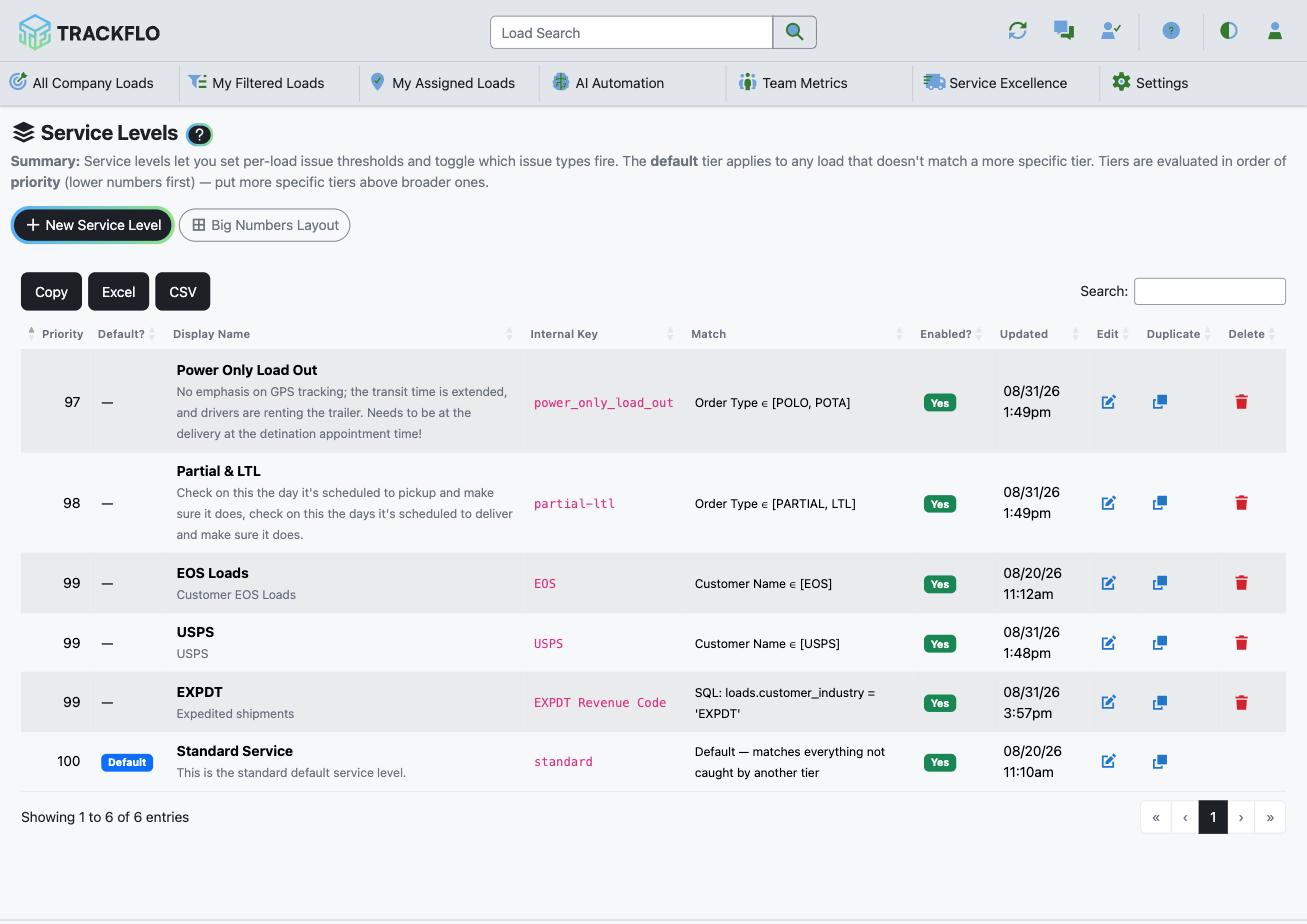
Open Service Levels and select Duplicate on the tier closest to what you want. The copy is created disabled with a (Copy) suffix, so nothing changes on the board while you edit it. To start blank instead, select New Service Level.
2
Match only the white-glove loads
Give the tier a Display Name and a Priority lower than your broader tiers, because the lowest number that matches wins. Number in tens so you can insert a tier later. Set Match Mode to Simple Match and pick values in Customer Name, Order Type, Carrier Name, Equipment Type, Customer Category, or Load Region. Values in one field are OR; fields together are AND. The line under each field shows how many loads it matches right now.
3
Switch on the exceptions and tighten the thresholds
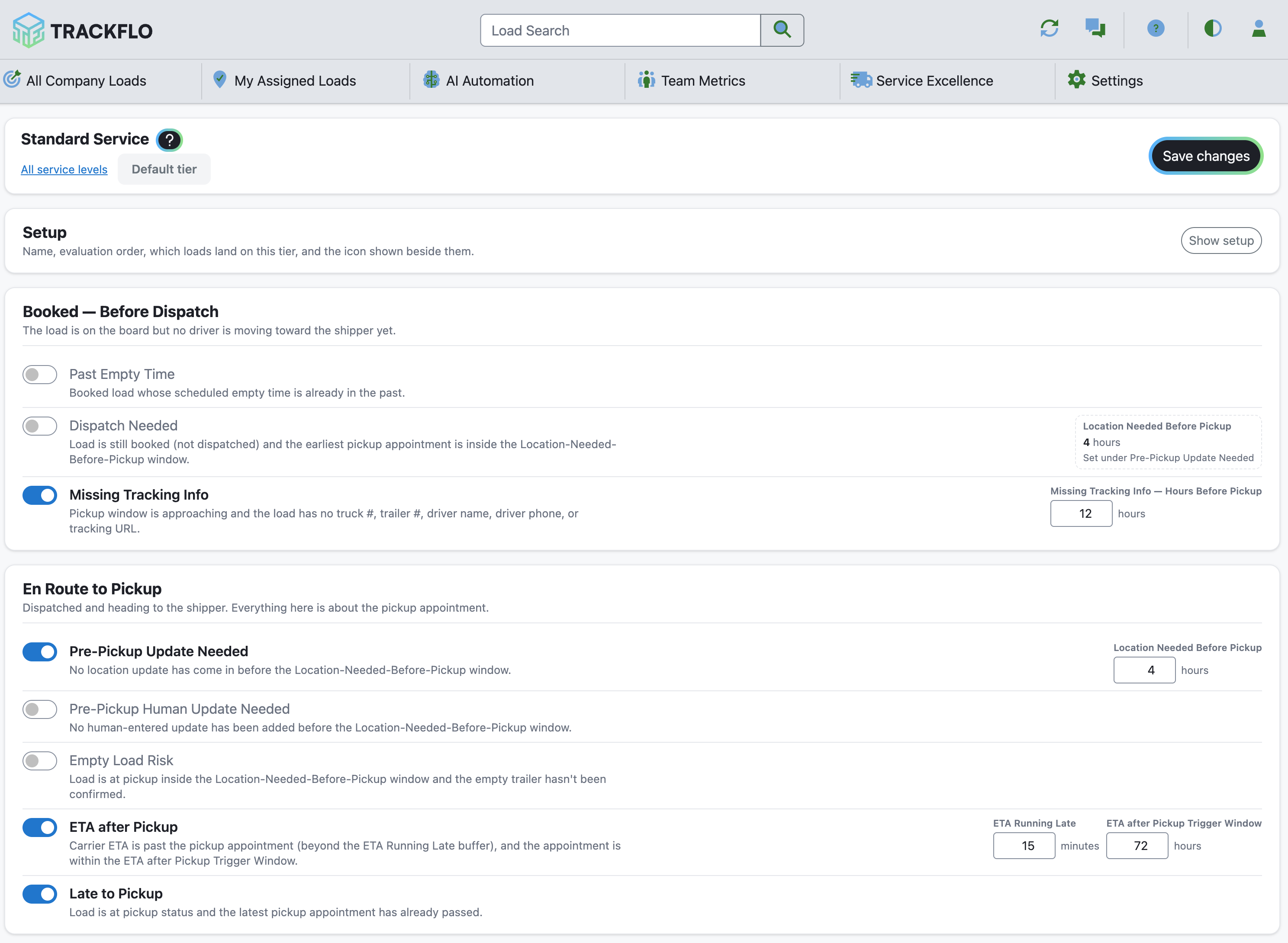
Turn on the exceptions your team will act on for this freight, then tighten the thresholds that matter to the customer:
Stationary Threshold: about 60 minutes, the lowest allowed, against about 600 minutes on standard freight.
ETA Running Late: 15 minutes, the default, or lower for appointment-critical freight.
Detention Risk Threshold: earlier than the customer's free time expires, so you hear about dwell while there is still time to act.
4
Make it recognizable and turn it on
Give the tier its own icon and color so trackers spot it on a busy board, then enable it and save. Every exception you turned on that isn't on the board yet gets a Big Numbers tile automatically, and exceptions re-evaluate across the board right away.

When it doesn't go to plan
The tier matches loads but nothing flags
The customer's loads still show the default tier
A broader tier with a lower priority number is taking them first. Give the white-glove tier the lowest number. Also check whether the customer bills under two names; pick both from the list, which shows every spelling your loads carry.
A value I entered shows amber
No load on the board carries that value right now. It is often a typo, and we suggest the closest match.
The board got noisier than we wanted
Change one threshold at a time and give it a week, so you can tell which change produced the difference.
Measure it
The white-glove customer's on-time pickup and delivery on Customer Scorecards, compared with the weeks before the tier went live.
Exceptions on white-glove loads are worked within the shift, with the tier's icon on every one, and the customer hears about a late delivery from you first.
Related recipes
Answer "Where's My Freight" Before the Customer Asks
Public load pages, exception alerts, and reports that put the answer in front of the customer first.
Read recipeWork Exceptions Instead of Making Check Calls
Let automation collect routine updates so the team works only the loads at risk.
Read recipeProduct docs
Customers can sign in to open the full setup guides:
Was this helpful?
Was this helpful?