

🏅 Tracker Performance Metrics
Team Performance metrics help admins understand how individual team members perform across a wide range of metrics over a chosen time period.
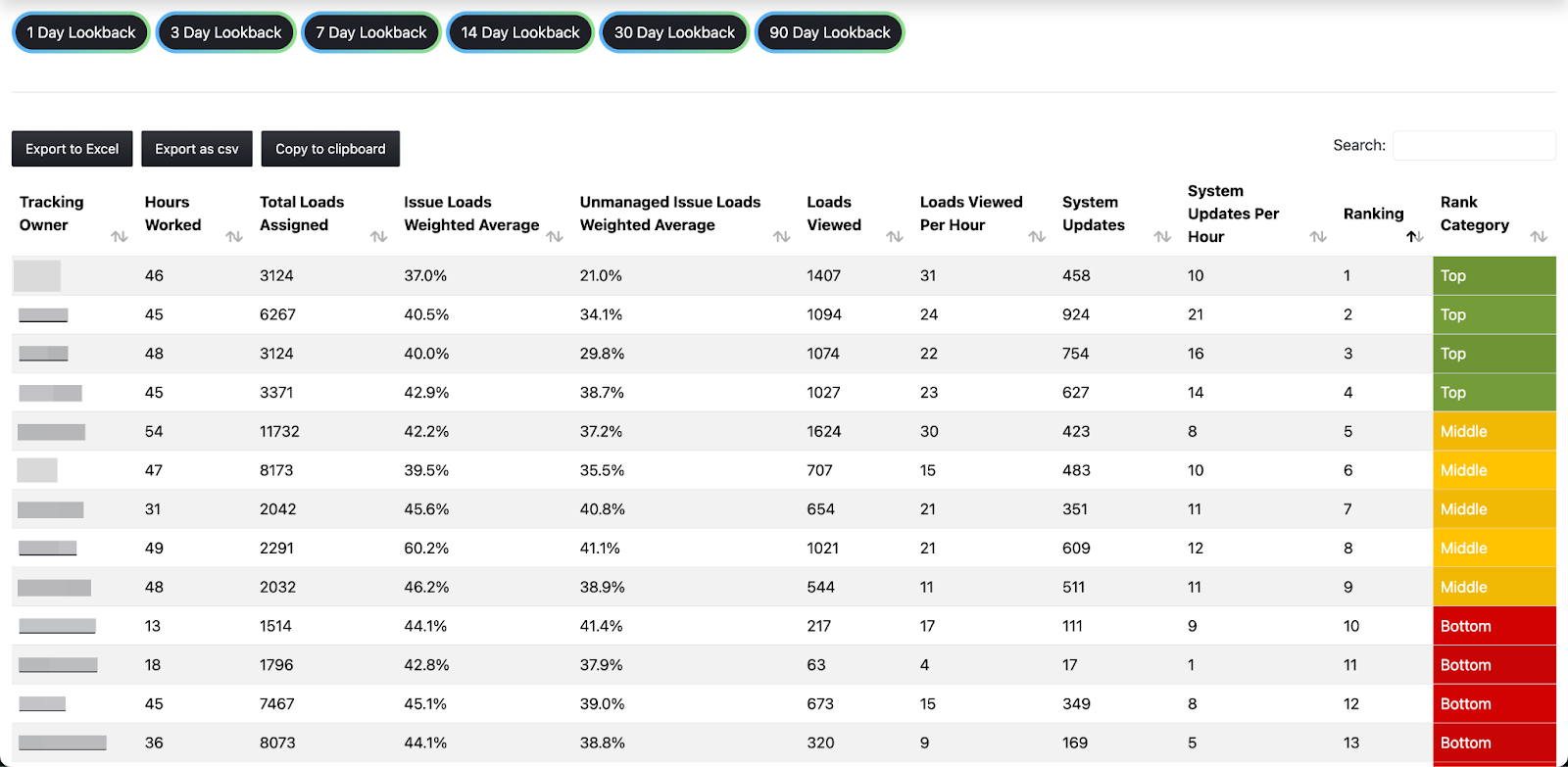
How to Interpret Performance Metrics
Performance metrics are only generated for users who are actively assigned loads in the Assignment Schedule. If a user is not listed in the schedule, their activity will not be tracked or included in performance reporting. Metrics also won’t be updated based on any actions taken while the user is unassigned.
Performance metrics should be viewed holistically, and a single metric doesn’t tell the whole story about a Tracking Owner’s performance. External factors, such as load volume or other load characteristics, can also influence these metrics.
Note: Performance metrics refresh hourly.
Metric Definitions
Metric | Description | Helps Admins understand… |
|---|---|---|
Tracking Owner | A user that has been assigned to track loads in the Lookback timeframe | – |
Hours Worked | The number of hours the Tracking Owner has been assigned loads in the Lookback period | – |
Total Loads Assigned | The number of loads the Tracking Owner has been assigned loads in the Lookback period (Note: Loads are not deduplicated if the user is assigned the same load multiple times in the Lookback period) | – |
Issue Loads Weighted Avg. | The weighted average of managed AND unmanaged issues out of all assigned loads | The number of loads with unresolved issues a user has at a given time. A particularly high number could mean that they are not resolving issues, or that the loads they are assigned have a particularly high volume of issues vs. peers. |
Unmanaged Issue Loads Weighted Avg. | The weighted average of unmanaged issues ONLY out of all assigned loads | The number of loads with unresolved and unmitigated issues a user has at a given time. Because managing an issue means the user attempted to resolve it, a particularly high number indicates the user was for some reason unable to resolve issues or manage them. |
Loads Viewed | The total number of loads viewed by the user in the Lookback period (Note: These are not deduplicated - viewing the same load twice counts as two views.) | How many loads a user viewed, a possible indicator of effort. |
Loads Viewed per Hour | Loads Viewed divided by Hours Worked | How many loads a user viewed, a possible indicator of effort. |
System Updates | The total number of system updates made in the Lookback period (System updates include any changes made to load data that are synced back to your TMS. This means managing loads, automated communication, and manual communication are not counted as system updates.) | How many updates to loads the user made, a possible indicator of impact. |
System Updates per Hour | System Updates / Hours Worked | How many updates to loads the user made, a possible indicator of impact. (Target: >15/hour) |
Ranking | A proprietary calculation based on the Tracking Owner’s Issue Loads Weighted Avg, Unmanaged Issue Loads Weighted Avg, Loads Viewed, and System update count | A Tracking Owner’s efficiency. Combining effort and impact metrics helps Admins understand if many actions (views/updates) are resulting in lower issue rates. |
Category | Indicates whether the Tracking Owner’s Ranking is in the top, middle, or bottom third of all Tracking Owners in the Lookback Period | A Tracking Owner’s efficiency vs. their peers. |